This document introduces our product
PDFing,
which can convert OS400
spooled-files to files in the "Portable Document Format" and other
common formats.
If you need support for PDFing, please see our
support page,
or review our
site-map
and
F.A.Q. pages.
Once you have downloaded a windows
installer file, just double-click on this file
to start the
install
process.
When installation is complete, you will see a short-cut to PDFing on
the desktop and a new option in the start-menu.
Please note that both versions of PDFing will operate in
"trial
mode" until you
purchase a license-key
and
apply it
PDFing on a
Microsoft® Windows PC
can be a server for a (reasonable) number of concurrent OS400 jobs on
any number of AS400
and/or iSeries machines. PDFing can convert many thousands of page per
second
but
performance
will necessarily vary, depending
on the speed of your systems.
Customers have reported successful conversion of *AFPDS spooled-files
containing 90,000 pages
and *SCS spooled-files containing over 200,000 pages.
Please note that, when TCP/IP is installed with Windows Server
2000/2003 the
TCP/IP Print Server
service is automatically started. This service also listens on port
515
and therefore will not allow PDFing to run! Unless you are using this
service to print
files sent from UNIX machines, you can safely stop this service and
change its
start-up option to "manual". You can find out more about this and other
problems
on our
F.A.Q. page.
When you have installed PDFing, you can start receiving spooled-files
from OS400. You must
first make PDFing "listen" for incoming spooled-files by by clicking on
the
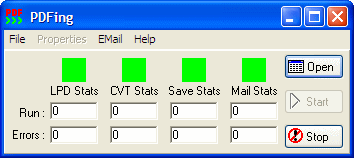
[Start] button. You will then see each "progress-box" change colour
from red to
green. If you have not configured and started the email feature, the
mail progress-box
will not change colour. Once started and
ready to process spooled-files
the PDFing window will look (something) like this:
Then execute the following OS400 commands which first creates a
spooled-file,
then command
SNDTCPSPLF
sends it to the PC
running PDFing:
DSPLIBL *PRINT

SNDTCPSPLF RMTSYS(*INTNETADR) PRTQ('PDFING') FILE(QPRTLIBL) JOB(*) SPLNBR(*LAST) +
 DESTTYP(*AS400) TRANSFORM(*NO) INTNETADR('nnn.nnn.nnn.nnn')
The value of the
INTNETADR()
parameter of the SNDTCPSPLF
command must be the IP address of the PC running PDFing. You can get
this address by running
IPCONFIG from the
DOS command-line of this PC
or by examining the TCP/IP properties in the Windows
[Settings|Networks]
panel.
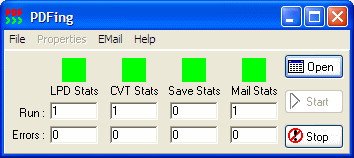
As PDFing receives and processes spooled-files, you will see the
statistical counters and
progress boxes change. After PDFing has received and processed the
spooled-file,
the PDFing window will look (something) like this:
Although the
SNDTCPSPLF
command is useful for testing
purposes, for most applications it is
much better
to use a
"remote-writer"
to send spooled-files to
PDFing. To use a "remote-writer", you must first
create an output-queue,
like so:
CRTOUTQ OUTQ(PDFING) RMTSYS(*INTNETADR) RMTPRTQ('laser') CNNTYPE(*IP) +
 DESTTYPE(*OS400) TRANSFORM(*NO) DESTOPT(*USRDFNTXT) +
 INTNETADR('nnn.nnn.nnn.nnn')
Please note the
RMTSYS(),
DESTTYPE()
and
DESTOPT()
parameter values must be copied
exactly
as given above and that the value of the
INTNETADR()
parameter must be the IP address of the PC running PDFing.
The command
STRRMTWTR
OUTQ(PDFING) will start a
"remote-writer" job that sends any spooled-files in the specified
output-queue
to PDFing. The writer job will continue to run until either OS400 shuts
down or the
ENDWTR WTR(PDFING)
command is executed
One you have started the "remote-writer", the following commands
will create a spooled-file which will be automatically sent to PDFing.
CHGJOB OUTQ(PDFING)

DSPLIBL *PRINT
To review processed spooled-files, click on the [Open] button or the
[File|Open] menu option
and you will then see a form containing a grid which has one row for
every spooled-file processed:
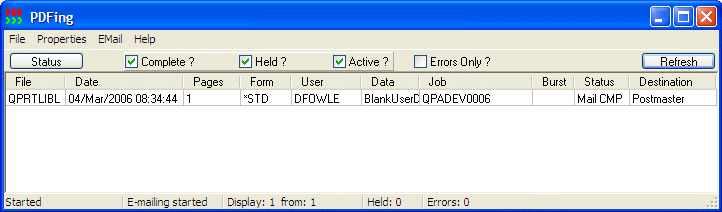
Select a row of this grid, and use the [Properties] menu to view the
output PDF or inspect the properties of the spooled-file that was
converted.
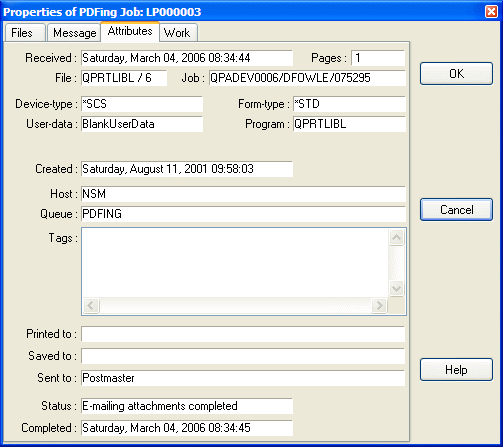
Further information on revewing spooled-files is provided by the
on-line help
supplied with PDFing.
As delivered, PDFing provides initial values for the parameters that
determine how spooled-files
will be processed. If you want to change these parameter values to suit
your own particular requirements,
you may click on the main
[File|Configure]
menu-option
to open the
configuration form
for PDFing.
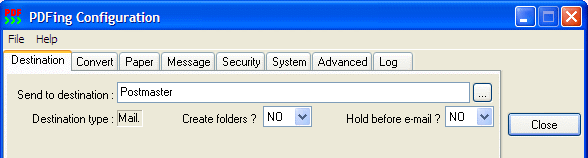
For instance, if you want PDFing to send the PDF file by
e-mail,
you must use the
[System]
and
[Destination]
page of the configuration form to specify parameter values for
emailing.
Users outside the United States, may also need to adjust the
translation-tables used by PDFing, as discussed by our
national-language
web-page.
The
LPR
protocol is extended by OS400 so that
spooled-file attributes are sent to PDFing as well as the text to be
converted.
For example, if you execute the following OS400 command and then
repeated the
Run Pdfing processs, the newly
created spooled-file would be converted
and attached to an email sent to:
recipient@thehost.
OVRPRTF FILE(QPRTLIBL) USRDFNDTA('EMA=recipient@thehost')
You can set a spooled-file's attribute values using the OS400 commands:
OVRPRTF,
CHGUSRPRTI
and
CHGSPLFA.
The
user-defined-data
and
user-defined-text
attribute values may contain
override parameter values, specified as a
series of
"tags" These
override
any
parameter values set by the default configuration and "markup" files.
They may,
for instance, instruct PDFing to send emails to specified recipient(s)
or
to save files to a specified disk location.
The more advanced processing
features
supported by PDFing
are defined by
markup
files.
You may
configure PDFing
so that, depending on each
incoming spooled-file's
name,
user-data and
form-type a
"markup" file is
selected automatically.
You may also specify the name of the "mark-up" file
to be selected for a spooled-file using OS400 native commands.
Please note that the
transform
process removes most spooled-file attributes
and you therefore
cannot use job-name,
form-type, user-data and
user-defined-data attribute values. However, we supply the CL source
for a
special
transform
exit-program,
which allows all attributes to be sent.
PDFing can run as a "service program" on Windows NT, 2000, 2003 and XP.
When running as a service, PDFing does not requires any user to be
logged-in,
it logs errors (and other) events to the system event-log and allows
both local and
remote users to concurrently control and inspect spooled-files
processed by this service.
The service client program:
PDFingCntrl.exe
must be run from the same
directory as that containing the service-program:
PDFingMailer.exe.
It presents a similar user-interface to the "interactive" version
described above,
except that the PDFing service itself cannot be started or stopped
using this program.
26th November 2007 - Cost of NT service license-key increased to 299.00
USD.
 Get PDFing!